Introduction
This documentation only applies to SPACE versions 1.0.0 and later. If you are using SPACE 0.3.0 or earlier, please refer to the SPACE < 1.0.0 User Guide instead.
Welcome to the SPACE User Guides section.
Here you’ll find step-by-step tutorials that explain how to perform common contracts and services management operations with SPACE, always grounded in a practical running example: PetClinic, a sample veterinary clinic management SaaS that is widely used to demonstrate the features of a particular software framework or technology in a real-world scenario.
All management operations described in this section are performed through the SPACE UI. If you need to perform them programmatically, please refer to the SPACE API Reference. The theory behind each operation would be the same.
🎯 What you’ll learn
- How to create and authenticate SPACE users
- How to create and manage organizations
- How to register services and attach pricing models to them
- How to create and manage contracts
- How to evaluate features and enforce usage limits in your SaaS
🐕 Our running example: PetClinic
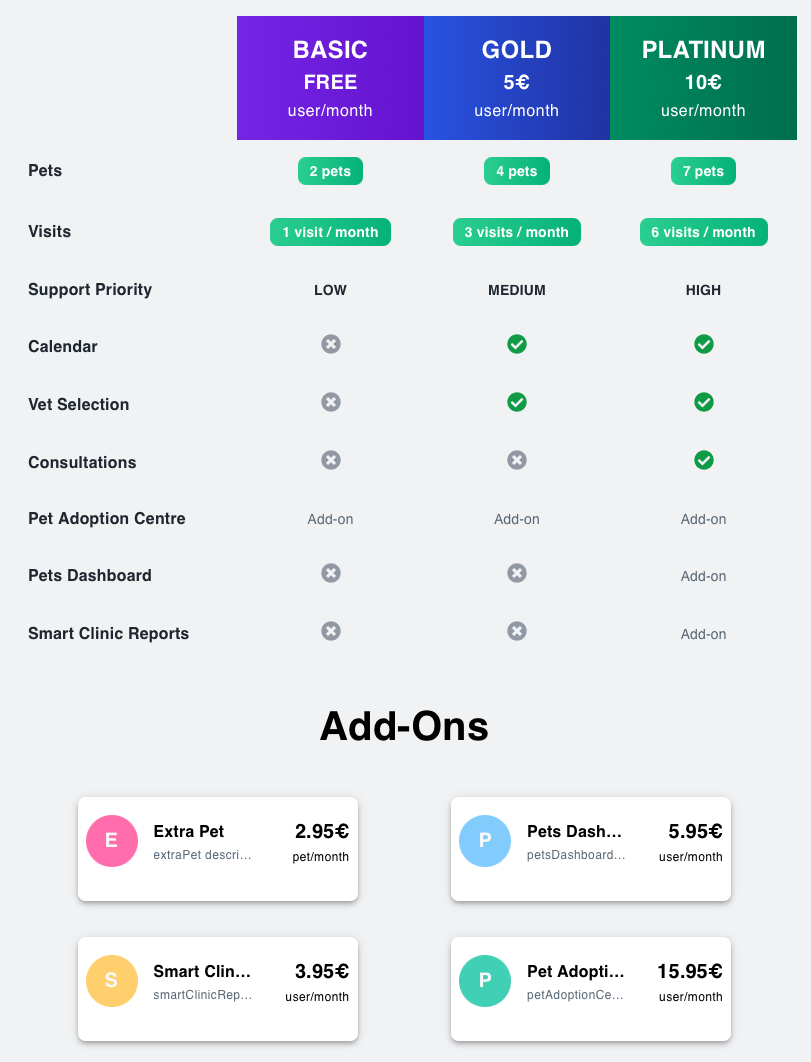
The figure below illustrates a pricing for PetClinic. It includes ten features regulated by three plans and three add-ons (seven by plans, three by add-ons) and imposes usage limits on the pets and visits features. Moreover, some add-ons are not available for all plans. For instance, Pets Dashboard can be contracted only if the user subscribes to the PLATINUM plan.
👉 Use the sidebar to explore the available guides. Each one includes code snippets, request/response examples, and explanations tied back to the PetClinic scenario.